


myApria Medical Supplies
4.7102.00 Reviews
App Specs
- Version
- 1.0.4
- Updated On
- License
- Free
- Downloads
- 10,000+
- Developer
- Accendra Health
- Categories
- Medical
- Platform
- Android
Screenshots
 Analysis by AppCompare
Managing medical supplies is rarely a one-time task. Equipment may need regular replacement, insurance details can affect what is available, and a delayed shipment can create a stressful gap in everyday care. After spending time with myApria, I found that its main value is not flashy technology but a more organized way to handle Apria-related information, request covered supplies, and follow an order after it leaves the warehouse. My overall view is positive: it is a practical companion for existing Apria customers, although it is much less useful for anyone who does not already receive supplies through Apria.
This is a free medical app from Accendra Health, aimed at everyone rather than a specialist clinical audience. It has reached over ten thousand installs and holds a 4.6 average from around four hundred ratings, which suggests that the basic idea is landing well with the people who need it. I would not treat those figures as proof that every account experience will be smooth, but they do make the app worth considering if Apria is already part of your care routine.
How myApria fits into the everyday supply routine
I look at myApria as a practical part of an existing supply routine, not a replacement for the decisions that routine involves. In this section, I’ll focus on how to use its account, ordering, and shipment tools thoughtfully—especially when planning ahead can matter more than checking an order at the last minute.
A focused tool rather than a general health dashboard
The first thing I noticed is how narrow the app’s purpose is. It is not trying to replace a doctor, diagnose symptoms, store a complete medical history, or become a universal wellness dashboard. Its job is closer to a customer-service and order-management companion for Apria. That focus is a strength because the important actions are easier to understand when they are not buried among unrelated health features.
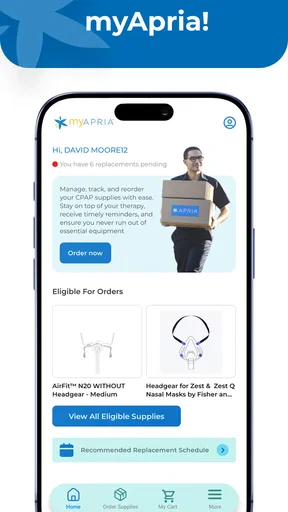
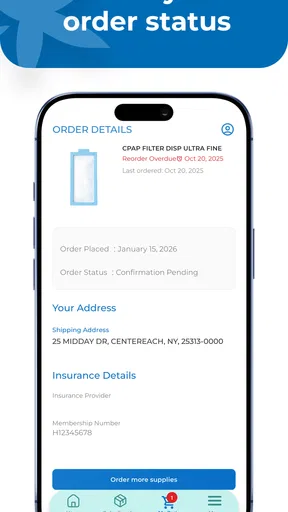
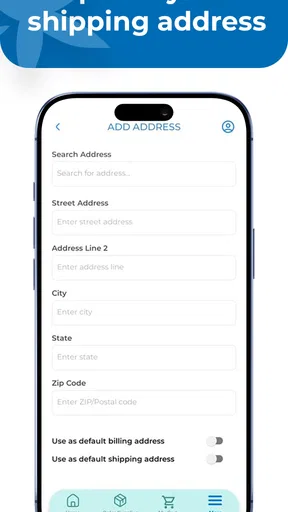
In practical terms, the app brings three parts of the supply process together: viewing Apria information, ordering supplies through insurance, and tracking shipments. Those steps often become scattered across phone calls, paper reminders, insurer details, and delivery notifications. Having them in one place can reduce the number of small administrative tasks that are easy to forget, especially for people managing recurring medical equipment rather than a single occasional purchase.
I also appreciate that the app is free. For a medical-supply tool, charging an additional subscription would feel especially frustrating when the user may already be dealing with insurance limitations and recurring care costs. The free price makes it easier to try without turning the decision into another financial calculation.
The most useful workflow is the complete order cycle
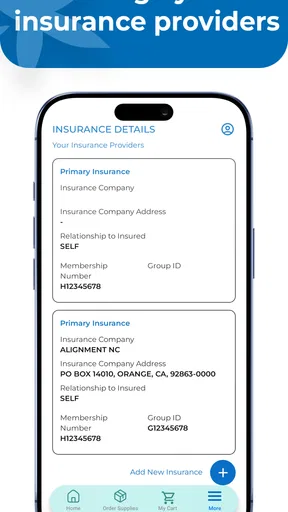
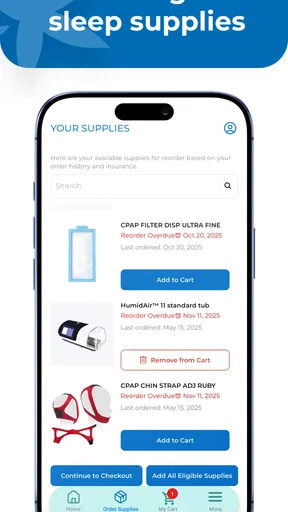
The strongest part of the experience is the way an order can be considered as a complete process rather than an isolated request. Before placing an order, I would use the app to check the relevant Apria information and confirm that the intended supplies are connected with the correct account. During ordering, the insurance-based process matters because the app is not simply an online shop where every item is treated like a normal retail purchase.
Worth Reading Before You Choose

Flipboard Shows What News Apps Must Do Beyond the Feed

Switching to Android Auto Means Rethinking Your Driving Routine

Google Calendar Makes a Crowded Week Easier to Manage

Ludo King Makes the Most of the Minutes Between Plans

Baby Panda World Brings Quick Play to Modern Phones, but Its Game Library Feels Busy

ESPN’s Live Game View Makes Following Close Games Easier
That distinction is important. A retail shopping app usually emphasizes price, stock, and fast checkout. Medical supplies can involve eligibility, coverage, replacement timing, and account-specific requirements. A tool that keeps the insurance context in view is more appropriate for this situation, even if it feels less immediate than buying an ordinary household product.
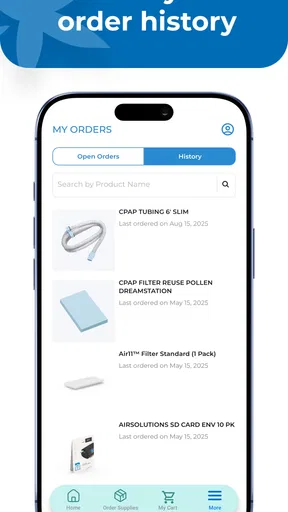
After ordering, shipment tracking becomes the practical payoff. I would check it when planning around a low supply level, preparing for travel, or deciding whether I need to contact support. The benefit is not just seeing movement on a delivery screen. It is having one place to revisit the order instead of searching through messages or trying to remember which request was made and when.
Small habits that make the app more useful
One useful habit is to check the account information before an urgent reorder, not after a problem appears. Medical-supply orders are a poor place to discover that an account detail needs attention. Reviewing the information first gives you a chance to notice a mismatch or missing step while there is still time to resolve it through the appropriate channel.
A second habit is to use shipment tracking as a planning tool rather than a reassurance button. If a delivery is moving normally, I can plan around it. If the status does not change as expected, I know earlier that I may need to follow up. That is especially valuable when a supply is essential and there is no comfortable margin for delay.
A third practical use is keeping the app as the reference point for an order after it has been placed. Instead of repeatedly contacting customer service for routine updates, I would first check the order status. This can save time for the user and reserve direct support for situations that genuinely need human attention, such as coverage questions, an account correction, or a delivery issue.
What the current version tells me about the experience
The current release is version 1.0.4, and it supports devices running operating system version 9 or later. That makes the app accessible on a broad range of reasonably modern phones, while still leaving older devices outside its supported range. If you are using an older handset, the operating-system requirement is worth checking before reorganizing your supply routine around the app.
Because this is an early version of a focused service app, I judge it mainly by whether it reduces friction in the Apria process. I do not expect it to offer the depth of a full medical-record platform, and I would not want it to pretend otherwise. Its success depends on clear account handling, dependable order information, and tracking that is easy to interpret. Those basics matter more here than a long list of extra tools.
Where it is stronger than the usual alternatives
The usual alternative is calling customer service whenever supplies are needed. A phone call may be better when an order is unusual or an insurance issue needs explanation, but it is inefficient for routine requests and status checks. The app gives those repeat tasks a self-service route, which is a meaningful advantage for someone who already knows what they need.
Another alternative is using a general retailer. That can be convenient for products that are safe and appropriate to purchase independently, but it does not provide the same insurance-centered context. If the supply is part of an established Apria arrangement, switching to a retail purchase may create uncertainty about coverage, replacement schedules, or whether the item is the correct one for the user’s plan.
A third alternative is relying on email, text messages, or a browser session for delivery updates. Those methods can still be useful, but they often separate the order history from the account information and the original supply request. The app’s advantage is its single-purpose structure: it keeps the Apria relationship and the shipment process closer together.
The meaningful limitation: convenience does not remove medical and insurance complexity
My main reservation is that an app cannot simplify every part of medical-supply ordering. Insurance approval, eligibility, replacement timing, and account-specific questions may still require clarification beyond a straightforward in-app request. A clean interface can make the process easier to navigate, but it cannot guarantee that every requested item will be covered or that every delivery will arrive on the user’s preferred schedule.
That means I would not rely on the app alone when supplies are running critically low. Tracking is helpful, but it is not the same as a guaranteed delivery appointment. If the status becomes confusing, a shipment appears delayed, or the item is essential to daily treatment, contacting Apria directly is the safer choice. The app should reduce routine uncertainty, not encourage users to ignore a developing supply problem.
There is also a learning curve for people who do not regularly manage online accounts. Someone comfortable with ordering and tracking will probably understand the workflow quickly. A caregiver assisting an older relative may need to spend more time making sure the correct account is being used and that the order details match the person’s actual needs. In that situation, the app can help, but it does not eliminate the need for careful checking.
Another trade-off is specialization. If you receive supplies from a different provider, myApria is not a general solution. Even within a household, it may not be useful for every person if their equipment comes through different channels. That is not a defect in the app’s design so much as a reminder that its usefulness depends heavily on the provider relationship.
Who should use it, and who should skip it
I would recommend myApria first to Apria customers who place recurring supply orders and want a simpler way to revisit account information, submit covered requests, and monitor deliveries. It is particularly well suited to people who are tired of making routine calls, caregivers coordinating repeat orders, and users who want a quick status check without searching through old correspondence.
It can also help someone who prefers to plan ahead. For example, imagine a person preparing for a week away from home while depending on regularly replaced supplies. They can review their Apria information, request what their insurance process allows, and watch the shipment before leaving. If the status does not progress as expected, they have an earlier signal to investigate rather than discovering the issue on the day of travel.
Caregivers may find the centralized workflow useful, but I would still recommend treating every order as something to verify carefully. The convenience of managing a relative’s supplies should not lead to assumptions about product type, quantity, or coverage. The app can organize the process; the caregiver remains responsible for checking that the request reflects the person’s actual routine.
I would skip it if you only need general health information, symptom guidance, medication reminders, or a comprehensive record of appointments. Those are different needs, and this app is not designed around them. I would also skip making it your primary plan if your Apria account is rarely used or if you normally need a human representative for every order. In those cases, the app may add another step rather than remove one.
Questions I would consider before installing
The first question is whether the app can replace every phone call. In my view, no medical-supply app should be approached that way. It is best for routine account tasks, supply requests that fit the insurance process, and shipment visibility. Complicated coverage questions, urgent shortages, and unusual order changes are still situations where direct support may be more appropriate.
The second question is whether tracking means the delivery is guaranteed. It does not. Tracking gives useful progress information, but users should still allow enough time for the order to arrive and act promptly if the status does not match their expectations. For essential supplies, keeping a reasonable personal buffer remains wise.
The third question is whether the app is suitable for a family member. It may be, especially when a caregiver is already involved in managing Apria supplies, but the account and order details need careful attention. I would not casually place an order from a shared phone without confirming whose information is active and what supplies are actually needed.
The fourth question is whether an older phone can run it. The app requires operating system version 9 or later, so a device below that threshold would not be suitable. For anyone using an older phone, checking the system version before depending on the app is a sensible first step.
My final view after weighing the trade-offs
myApria succeeds because it concentrates on a real administrative problem: keeping Apria supply management, insurance-based ordering, and delivery tracking in one focused place. I found that more valuable than a collection of unrelated health features would have been. The free price also lowers the barrier to trying it, and the strong average rating from its current user base gives it a credible starting point.
Still, I would describe it as a convenience layer, not a replacement for judgment or support. It cannot make insurance decisions on the user’s behalf, guarantee that a delivery will meet an urgent deadline, or serve people whose supplies come from another provider. Those boundaries matter, particularly when the equipment is essential.
My recommendation is clear: install it if Apria is already your supply provider and your orders are mostly routine. Use it to organize requests, check the account before reordering, and monitor shipments early enough to respond to problems. If your needs are broader than Apria supplies, or if every order requires detailed personal assistance, a direct support route may still be better. For the right audience, however, this is a focused and sensible medical app that can remove several small but recurring hassles from everyday care.
With a release date of February 16, 2026, the app is still relatively new, so I would keep an eye on how its workflow develops over time. Even so, the current version presents a convincing case for a dedicated Apria companion. It does not try to be more than it needs to be, and that restraint is exactly why I can recommend it to the people it was built to serve.
Pros
- Direct access to Apria medical supply and respiratory-care services
- Convenient account management from a mobile device
- Helps users track orders and review supply information
- Useful for managing recurring medical equipment needs
- Can reduce the need for phone calls to customer support
Cons
- Availability and features may depend on your Apria account and location
- Not intended for emergencies or urgent medical advice
- Some medical supplies may require insurance or provider approval
- App usefulness is limited for users who do not receive Apria services
- Login or account issues could delay access to important information
FAQs for myApria Medical Supplies
What is myApria Medical Supplies used for?
myApria Medical Supplies is designed for Apria Healthcare patients who need to manage medical equipment, supplies, and related services from a mobile device. Depending on your account and location, the app may help you review supply information, request eligible replacements, check order details, and access support. Available features can vary, so it is best used as a companion to Apria’s regular customer service and clinical guidance.
Who can use the myApria Medical Supplies app?
The app is primarily intended for existing Apria Healthcare customers, particularly those receiving covered medical equipment or recurring supplies. You generally need an eligible Apria account and accurate login information to access personalized services. New users may need to complete registration or contact Apria before using all features. Availability can also depend on your insurance plan, equipment type, region, and the services connected to your account.
Can I order or reorder medical supplies through myApria?
In many cases, myApria allows eligible users to review supply needs and submit replacement or reorder requests without calling customer service. However, not every product or account qualifies for automatic ordering. Insurance authorization, prescription requirements, supply schedules, and Apria’s fulfillment policies may affect what you can request. Always verify the product, quantity, and delivery information before submitting an order.
Is myApria Medical Supplies safe for managing personal health information?
Because the app may handle account details, delivery information, and healthcare-related data, users should access it only through the official Google Play Store or Apple App Store and keep the app updated. Use a strong, private password and avoid signing in on shared devices. The app should not replace medical advice, and you should contact Apria directly if you notice suspicious account activity or incorrect information.
What should I do if the app does not work or my order is missing?
First, check your internet connection, update myApria to the latest version, and confirm that your login details are correct. If the problem continues, try restarting the app or device before contacting Apria support. For urgent equipment issues, delayed deliveries, damaged supplies, or medical concerns, do not rely solely on the app—use Apria’s official customer service channels or contact your healthcare provider when appropriate.


